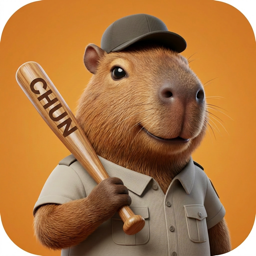
If you are looking for a Finch App alternative for Mac, the top choice is CHUNS. While Finch is an excellent self-care pet app for iOS and Android, it lacks a desktop companion. CHUNS fills this gap by bringing cozy 2D companions (like capybaras and cats) directly into your macOS menu bar, helping you focus during work using integrated Pomodoro timers and study streaks.
Finch has won millions of hearts on mobile devices by gamifying self-care. It lets users take care of a virtual bird by completing daily check-ins, tracking habits, and practicing mindfulness. However, many knowledge workers and students who use macOS spend most of their productive hours looking at a computer screen, not their phones.
This has led to a growing demand for a "Finch for Mac" style experience—a cozy, non-intrusive companion that sits on the desktop, gamifies productivity, and keeps you company during long hours of work or study.
Finch vs. CHUNS: Main Differences
| Feature | Finch App | CHUNS for Mac |
|---|---|---|
| Platform | iOS / Android (Mobile only) | macOS Menu Bar (Desktop native) |
| Primary Focus | Mental health, journaling, habit checks | Desktop companionship, study timer, body doubling |
| Visual Vibe | Bright vector illustrations | Cozy 2D hand-drawn sprites (lo-fi aesthetic) |
| Task Loop | Write diaries, check custom habits | Complete Pomodoro timers, maintain study streaks |
| Privacy | Account sync (remote servers) | Personal iCloud sync |
Why Mac Users Prefer CHUNS as their Desktop Companion
1. True Screen Presence (Body-Doubling)
Finch requires you to pick up your phone, which can lead to social media distractions. CHUNS resides directly on your desktop screen near the menu bar. Having Francis (the capybara) or Mochi (the cozy cat) study on screen alongside you creates a gentle "body-doubling" effect—a technique widely recommended for people with ADHD or those working alone in remote setups.
2. Nurturing Through Concentration
In Finch, you level up by completing habits. In CHUNS, you take care of your companion by completing focus sessions. By starting the integrated 25, 45, or 60-minute timers, your CHUN enters its "focus state", studying with books or relaxing quietly next to your active windows. Success rewards you with stars, which you can use to unlock new characters (like Bling the hip hop hippo) or custom skins.
3. Personal iCloud sync
CHUNS does not require an account to use its desktop companion features. Its settings and progress can sync through the user's personal Apple iCloud account. See the Privacy Policy for the current data-handling details.